Version: 0.21.0This documentation is for Spitfire 0.21.0.
Version comparison (A/B)
The answer to "is the new version slower?". A comparative run runs a test against two of its environments at the same time and with the same load, and compares the results step by step, with confidence intervals. Arm A is the reference (usually the live version), arm B the candidate. Both arms run the same scenario, steps, thresholds and load model; only the environment differs.
What it does
- Running both arms at once spreads network, cache and shared-infrastructure effects evenly over both sides. It is far more reliable than comparing two runs made at different times.
- Every difference gets a confidence interval; the verdict is "worse", "better", "no difference" or inconclusive. The "maybe it is noise" debate ends.
- The equivalence check verifies, before the comparison, that the two environments really are "apples to apples".
- A/A calibration measures the two environments' own natural difference and takes it out of later comparisons.
- Sequential mode takes turns, A, B, A, B, when you have a single environment or the environments share a database.
When to use it
- Before a release: "is v2.4 slower than the live v2.3?"
- After a configuration change (cache on/off, a new database version, a new pod size).
- As a CI gate per PR: the pipeline goes red if the candidate got worse (see CI/CD).
- Automatically every night: "dev against test" (see Schedules).
If you only want to look at one test's runs from different times, the Comparing runs side by side section below is enough.
Preparation: environments
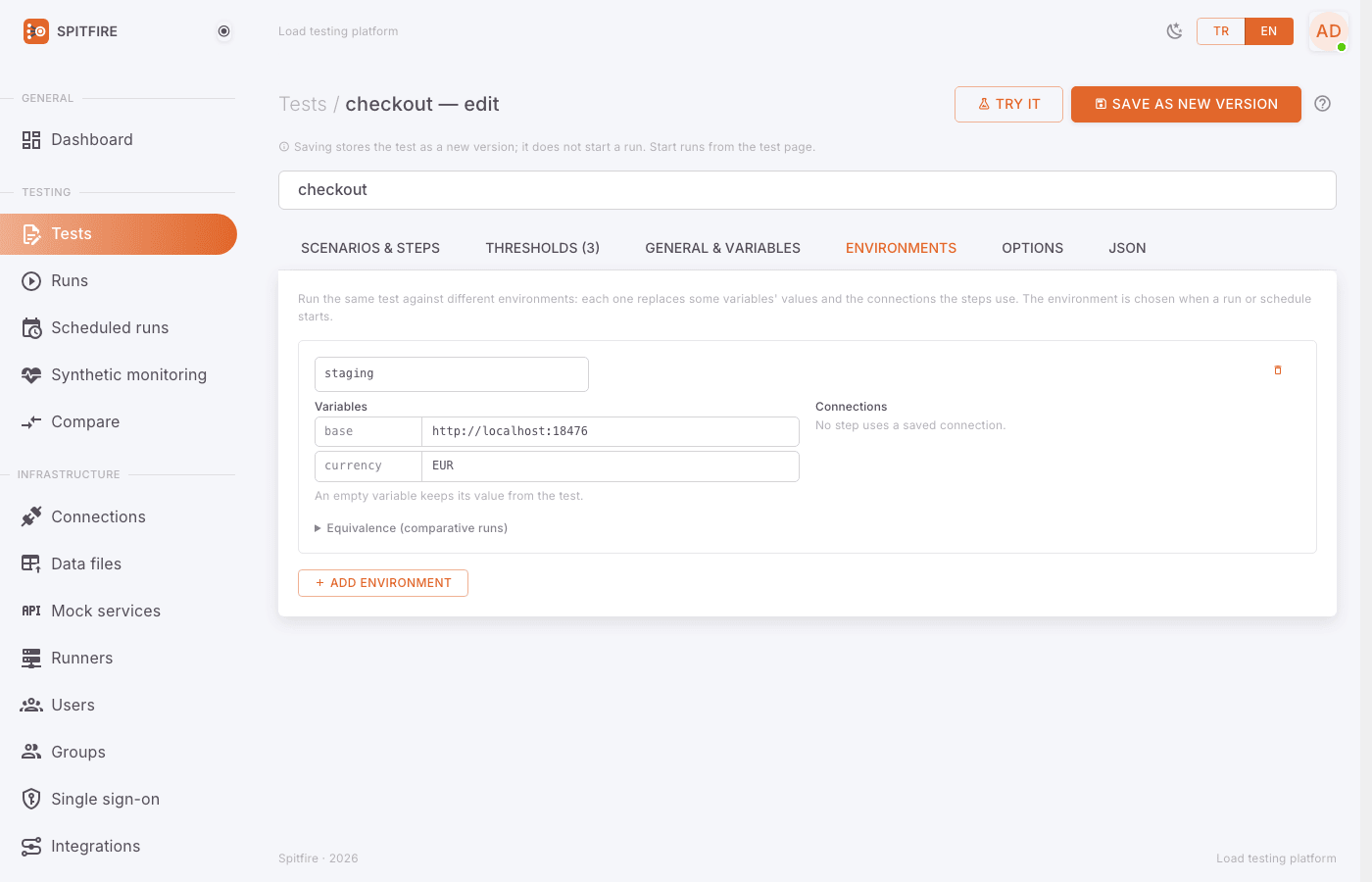
The two arms of a comparison are the test's environments. An environment holds the values of
the test's variables (e.g. the base address) and the connections its steps use in that
environment.
 Environments tab
Step by step:
Press Edit on the test page and open the Environments tab in the editor.
Create two environments with Add environment (e.g.
testanddev). For each:- Write the Environment name.
- Under Variables enter that environment's values (e.g.
base=https://test.example.com). An empty variable keeps the test's value. - Under Connections map each saved connection the steps use to that environment's (e.g. test database / dev database), or leave it as same connection.
(Recommended) Fill in Equivalence (comparative runs). This is what the environment runs on, as the team knows it; nothing here is measured. Fields: CPU, Memory, Instances (pods), Database version, Data volume, Cache (Redis …) state, Shares a database, cache or server with and What is shared (e.g. one PostgreSQL, one Redis).
(Recommended) Fill in Version endpoint (optional):
- Version endpoint URL: e.g.
{{base}}/version(it may use the test's variables). - Where the version is: JSONPath (e.g.
$.version), Header (e.g.X-App-Version) or Plain text (the whole body). - Write the expression under JSONPath or header name.
The version is read with a single GET when a comparative run starts. An empty version label takes it; when both arms report the same version the run can be recorded as A/A. In sequential mode Spitfire also sees the version switch on this endpoint.
- Version endpoint URL: e.g.
Save the test.
A version endpoint helps in three places: you do not type labels by hand, Spitfire
notices an A/A situation itself, and --auto-switch works in sequential mode.
Starting a comparative run
 Comparative run dialog
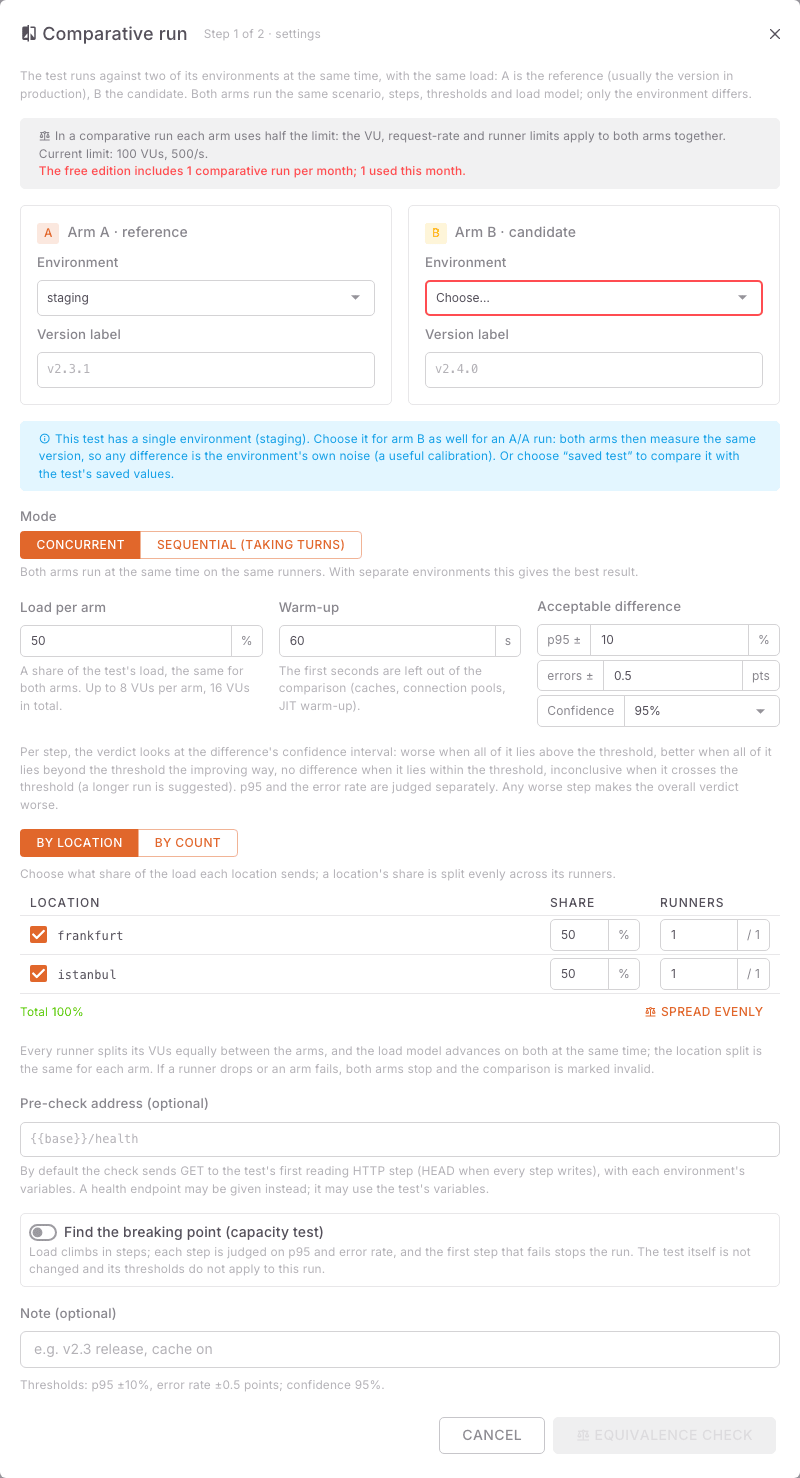
Step 1/2 · settings
- On the test page press the arrow next to Run (More run options) and choose Comparative run.
- Pick the Environment for Arm A · reference (or saved test: the test's own values). By default the environment of the test's latest run is chosen.
- Pick the environment for Arm B · candidate. The default is the next environment.
- If you choose the same environment for both arms, the dialog says it becomes an A/A run: both arms measure the same version, and the difference is the environment's own noise.
- Write a Version label per arm (e.g.
v2.3andv2.4; at most 64 characters). Left empty, what the version endpoint reports is used. - Mode: Concurrent (default; both arms at the same time on the same runners) or Sequential (taking turns) (see below).
- Load per arm: a share of the test's load, the same for both arms. The default 50% means both arms together load the runners as the test alone would.
- Warm-up (s, default 60): the first seconds are left out of the comparison (caches, connection pools, JIT warm-up). Raise it if your application warms up slowly.
- Acceptable difference: Acceptable p95 difference (percent) (default ±10%) and Acceptable error rate difference (points) (default ±0.5 points).
- Confidence: the confidence level, 90%, 95% (default) or 99%.
- If the test changes data, a separate confirmation appears per environment, e.g. "I confirm data will change in arm A (test)". Tick both.
Step 2/2 · equivalence check
- Go on to the Equivalence check. The chosen runners send each arm 20 light requests (at most 15 s): "Checking both arms (at most 15 s)…".
- Read the result (details below). The status is Equivalent, Warnings, Failed or Not run.
- Start:
- With no warnings, Start comparison.
- With warnings, I have seen the warnings; start the comparison anyway — or go Back, fix things, then Check again.
- If the check could not run, Start without the check (the comparison records that no check was made).
Nothing is blocked; you are only asked to see and confirm the warnings. Confirmed warnings stay on the verdict card as Equivalence warnings.
How the load is shared
- Every runner splits its VUs evenly between the arms (4 runners and 400 VUs: each runner runs 50 VUs for A and 50 for B); a slowdown on a runner (CPU, network, GC) affects both arms alike. The location split is the same for each arm.
- Both arms start together; with a ramping load the stage changes happen at the same moment.
- With data files in
uniquemode each arm uses its own half of the rows;sequentialandrandomfiles are shared. - License limits apply to both arms together: each arm uses half of the VU and requests/s limit.
- If a runner drops or an arm fails, both arms stop together and the comparison is invalid; it never goes on with one arm.
The equivalence check
The check puts three things side by side:
1. Measured (through the chosen runners, GET or HEAD only, each request on a new connection):
Reachability, Response time (median), TCP connect (median), TLS handshake
(median), HTTP version, TLS. By default the request goes to the test's first reading HTTP step; you may give
a Pre-check address (optional) instead, e.g. {{base}}/health.
Warnings:
- response times differ by more than 25% and 5 ms,
- connect times differ by more than 5 ms and 10% ("environment B (dev) is 18 ms further from the runners; the results include that difference"),
- HTTP/2 against HTTP/1.1; TLS against no TLS or another version,
- 5xx answers or requests without an answer.
An arm that never answers makes the check Failed.
2. Declared: the Equivalence fields from the Environments tab side by side; values both filled in differently are highlighted.
3. Shared infrastructure: when the two environments map a step's connection to the same saved connection or the same host:port, or both arms' addresses are the same server: "These two environments share a database. In a concurrent run both arms compete for it and the difference can be hidden. Use separate resources or choose the sequential comparison mode." The dialog offers Switch to a sequential comparison.
With a version endpoint the versions are read too. If both arms report the same version, the dialog asks whether to record it as an A/A test: Yes, an A/A run (the same version on both arms) or No, a version comparison.
The live screen
While the run goes, the comparison page shows:
- A and B drawn over each other on every chart (two fixed colour-blind-safe colours, the version labels in the legend), with the current difference under each chart.
- The Steps (live) table with A, B and Diff columns. A difference in the worse direction is yellow; past the threshold it is red. These values are cumulative and include the warm-up; the verdict covers only what comes after it.
- Stop both arms stops them together; what was measured is compared and the result carries a "stopped early" note.
Reading the verdict
 Comparison result
The verdict card
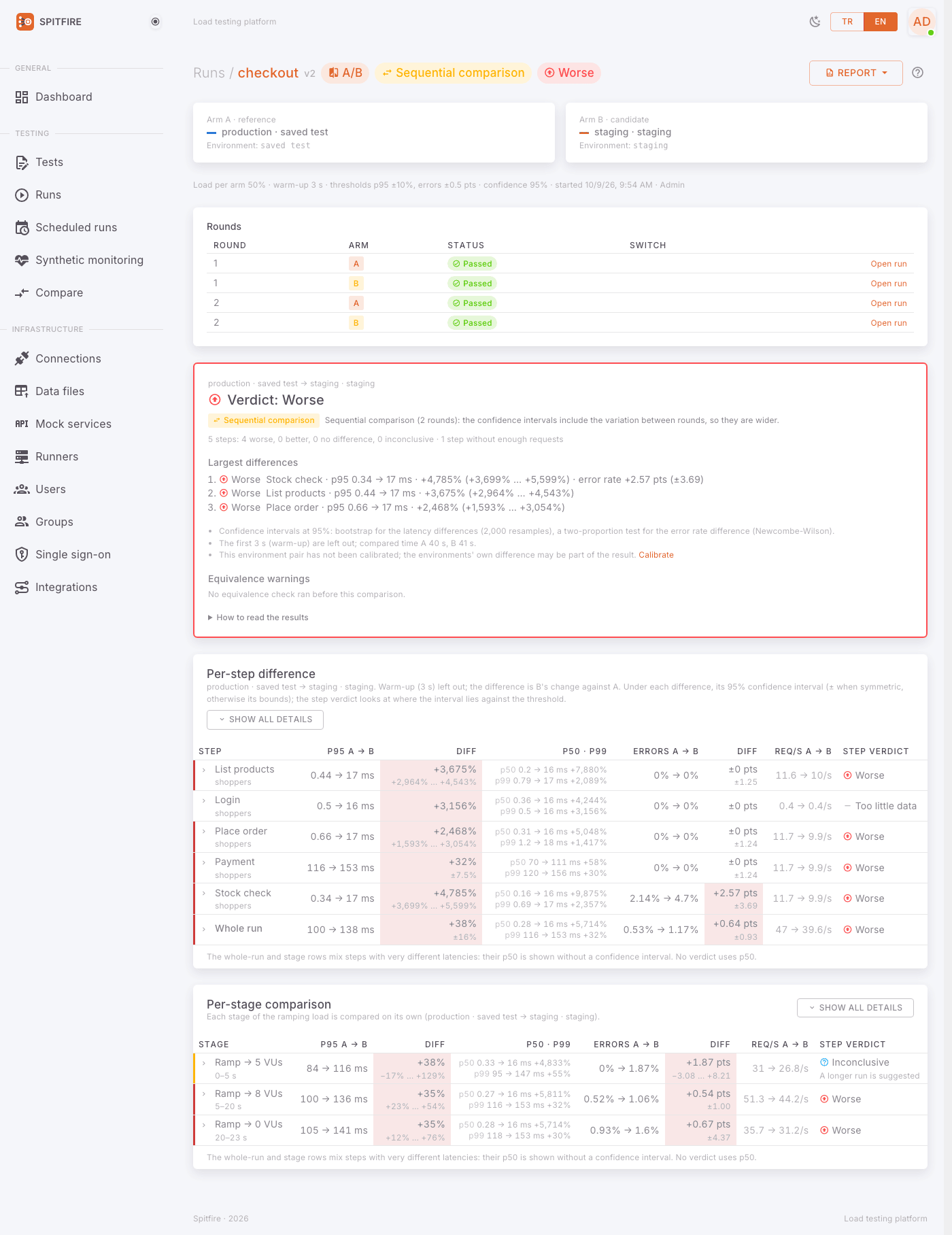
The card opens with the overall Verdict:
| Verdict | Meaning | API |
|---|---|---|
| Better | At least one step is confidently better, none worse | better |
| No difference | Every step is within the acceptable difference | no_difference |
| Worse | At least one step is confidently worse than the acceptable difference | worse |
| Inconclusive | Every judged step's interval crosses the threshold | inconclusive |
| Invalid | An arm failed, a runner dropped, a version switch did not come in time… | invalid |
The card also shows the Largest differences (at most 3), the step counts ("7 steps: 1 worse, 0 better, 6 no difference, 0 inconclusive"), the confidence level, the calibration status, the equivalence warnings and a short How to read the results.
Reading a confidence interval
+26% (±4.0%) under a difference means: the measured difference is +26%; the true difference is
most likely (95% confidence interval) between 22% and 30%. An asymmetric interval shows its bounds.
A step's verdict looks at where the interval lies against the acceptable difference (p95 ±10% by default):
- the whole interval above +10% → Worse,
- the whole interval below −10%, in the better direction → Better,
- the interval within ±10% → No difference,
- the interval crosses the threshold → Inconclusive: the difference may or may not be acceptable. A longer run narrows the interval.
p95 and error rate are judged separately; the cautious one wins. A step with fewer than 20 requests on either arm after the warm-up is not judged (Too little data). Even with no errors, a few hundred requests cannot rule out a 0.5-point rise in the error rate: such a step stays inconclusive.
Overall: if any step is worse, Worse; otherwise if a step is better, Better; otherwise No difference (with an "inconclusive steps" note when there are some).
When the result keeps coming back Inconclusive, the cure is nearly always a longer run or more requests. Also check that the warm-up does not eat most of the run.
The tables
- Per-step difference: for each step, p95 A → B and its difference, p50 and p99 in short, the error rate, requests/s and the step's verdict. Expanding a row shows the p50/p99 intervals and the request counts; Show all details expands them all. The Whole run row and stage rows mix steps with very different latencies, so p50 shows there without an interval; no verdict looks at p50.
- Per-stage comparison (with a ramping load): e.g. "no difference at 100 VUs, B 31% slower at the 400 VU stage".
- Breaking points (breakpoint runs): both arms' breaking points side by side.
- Thresholds per arm: threshold failures shown per arm.
In run lists a comparison is one row with both arms; each arm stays an ordinary run (open it from the comparison). If one arm is deleted, the comparison keeps its verdict and summary.
How it is computed (in short)
- Latency differences (p50, p95, p99) use a bootstrap: every latency series is a DDSketch with 1% relative accuracy; 2000 resamples divide B's percentile by A's, the interval is the 2.5–97.5% slice, widened by the sketch's accuracy.
- The error-rate difference uses a two-proportion test (Newcombe-Wilson): safe with no errors and with small counts.
- Intervals are seeded with the comparison's id: the same data always gives the same result.
- Spitfire states the difference and the numbers; it never claims a cause it did not measure.
A/A calibration
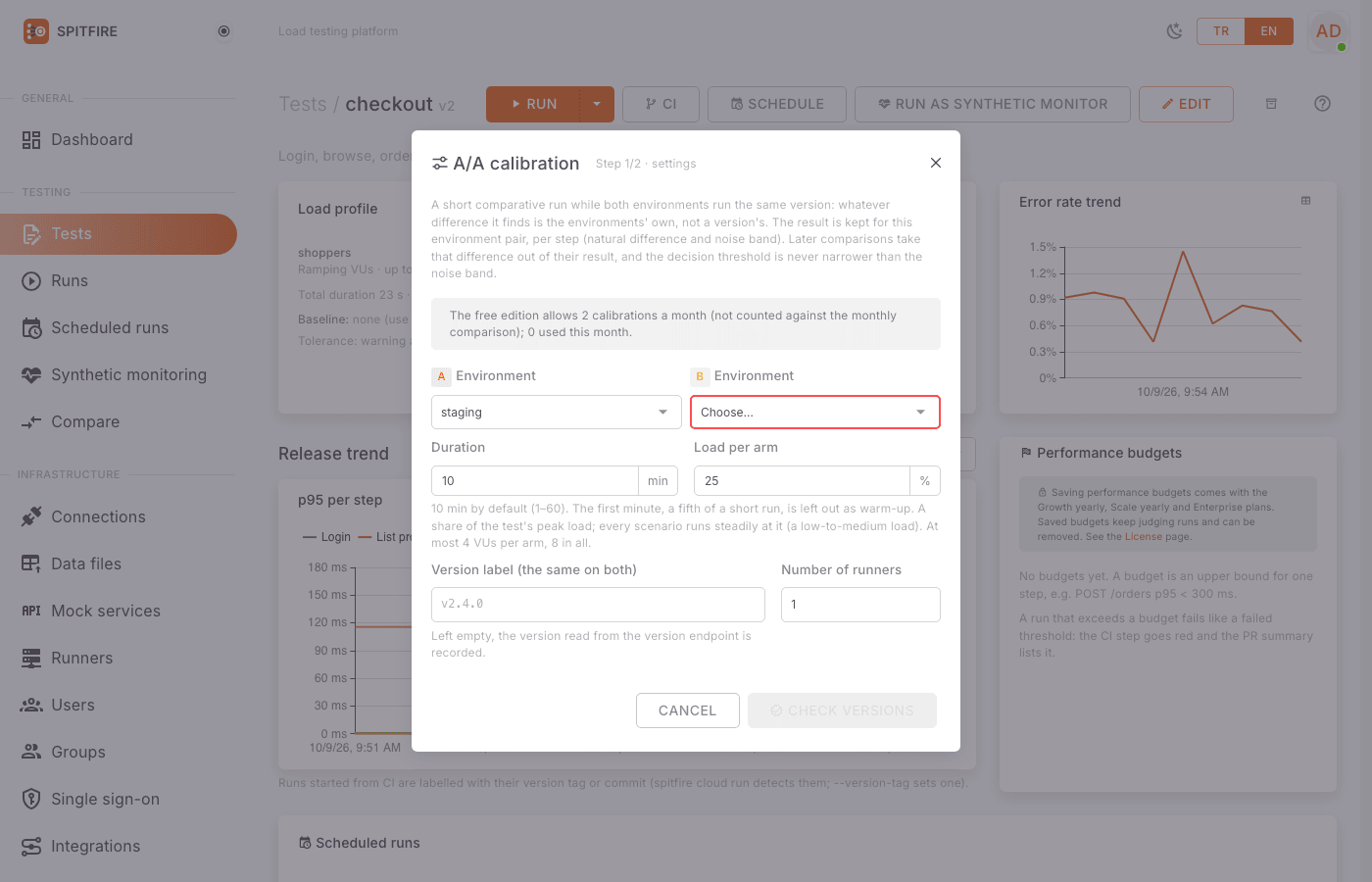
Two environments are never exactly equal: other servers, another network path, other data volumes. A/A calibration measures that difference; later comparisons take it out of the result.
 A/A calibration dialog
Step by step:
- Make sure both environments run the same version. That is the point of calibrating.
- On the test page press More run options → Calibrate (or Calibrate under the arms' calibration status in the comparative run dialog).
- Duration (min): 10 by default (1–60). The first minute (a fifth of a short run) is left out as warm-up.
- Load per arm: a share of the test's peak load (default 25%); every scenario runs steadily at it (a low-to-medium load).
- Version label (the same on both): left empty, the version read from the version endpoint is recorded.
- Press Check versions. If the versions differ, the confirmation "The versions look different; calibrate anyway" is needed; if they cannot be read, that is said.
- Start calibration.
When the run ends, what it measured is stored per step for the environment pair: B's natural difference in p95 (and p50, p99) against A, and the noise band, the interval's half-width.
In later comparisons (in either direction):
- Latency:
corrected = (1 + raw) / (1 + calibration) − 1. Example: raw +26%, calibration +3% → corrected about +22% (1.26 / 1.03 − 1). - Error rate:
corrected = raw − calibration(points). - Threshold: the acceptable difference for a step is raised to at least the calibration's noise band (a pair whose p95 moves ±12% on its own is judged with ±12%, not ±10%).
- The step table shows Raw diff, Calibration and Corrected side by side.
- Steps missing from the calibration (new steps) are judged uncorrected, with the normal threshold, and noted.
- The verdict card names the calibration and its age; for one older than 30 days it suggests recalibrating. A pair never calibrated gets a note that the environments' own difference may be in the result.
The free edition has 2 A/A calibrations a month, not counted against the monthly
comparison. Paid keys with compare_runs calibrate without limit.
Sequential mode
With a single environment, or two that share a database, cache or server (the equivalence check warns about it), choose Mode → Sequential (taking turns). The arms take turns on the same runners: A, B, A, B.
- Rounds: 2 by default, at most 5. Each round is an ordinary run of the test's whole load model, and leaves out its own warm-up.
- Longest wait for a version switch: 30 min by default (1 min–24 h). Past it, the comparison is invalid.
On one environment (A and B the same)
- When the run starts, version A must be running in the environment.
- After A's round Spitfire waits; the page shows a Waiting for the version switch card telling you which version to switch to.
- Switch the version (deploy it), then confirm the switch in one of three ways:
- the I switched to version B, continue button on the page,
spitfire cloud continue <comparison id>(e.g. as the last step of your deploy pipeline),POST /api/v1/comparisons/{id}/continuewith an API token.
- If the environment has a version endpoint, Spitfire reads it every 10 s and sees the switch itself; the round then starts on its own.
- Do the same for the next switches (B → A → B…).
On two environments
Nothing to switch; the rounds run one after the other and the two environments never take load at the same time.
Why the band is wider
In a sequential comparison the arms never share the same seconds; the confidence intervals include the change between rounds and are at least √2 ≈ 1.41 times wider than a concurrent comparison's with the same data. The verdict card says "Sequential comparison"; each row's widening factor shows in its tooltip.
Breakpoint tests and A/A calibrations do not run in sequential mode (rounds must have the same length). A failed round or a controller restart makes the comparison invalid.
Comparing from CI
spitfire cloud run "Checkout flow" --compare A=test,B=dev --label-a v2.3 --label-b "$GIT_SHA"Sample output:
v2.4 (dev) vs v2.3 (test): WORSE
  7 steps: 1 worse, 0 better, 6 no difference, 0 inconclusive
  calibration: none (the environments' own difference may be in the result)
  worse checkout: p95 +26% (±4%)
…| Exit code | Meaning |
|---|---|
0 |
better or no difference (and inconclusive, without --fail-on-inconclusive) |
98 |
worse (and inconclusive, with --fail-on-inconclusive) |
97 |
invalid, or the equivalence pre-check failed with --strict (the comparison does not start) |
99 |
arm B failed its thresholds or a performance budget (arm A's failures are printed, not counted) |
2, 1 |
writes not confirmed (--confirm-writes confirms both environments), other errors |
Important flags:
--strict: does not start when the equivalence pre-check fails (an arm does not answer); exits97.--fail-on-inconclusive: counts an inconclusive result as98. Recommended for a strict gate.--report comparison.pdf(or.html): the comparative report;-o comparison.json: JSON.--pr-comment/--summary-md: the comparison's PR/MR comment (in the--report-langlanguage).- Sequential mode:
--compare-mode sequential,--rounds,--switch-timeout,--auto-switch(trusts only the version endpoint; refused without one):
spitfire cloud run "Checkout flow" --compare A=test,B=test --compare-mode sequential \
  --label-a v2.3 --label-b "$GIT_SHA" --auto-switch
Without --auto-switch, Enter in a terminal confirms the switch, or another job runs
spitfire cloud continue <id>. Full GitHub Actions and GitLab CI examples are on
CI/CD.
Report and notifications
- The Report menu on the comparison page opens the comparative report as HTML in a new tab, downloads a PDF, and makes a share link (1–90 days, Turkish or English, revocable).
- When a comparison finishes (A/A calibration runs excepted), channels subscribed to
run.comparedhear it: "📉 Checkout flow — v2.4 vs v2.3: worse". A channel that wants problems only hears just worse and invalid results. Channel setup: Notification channels.
Comparing runs side by side
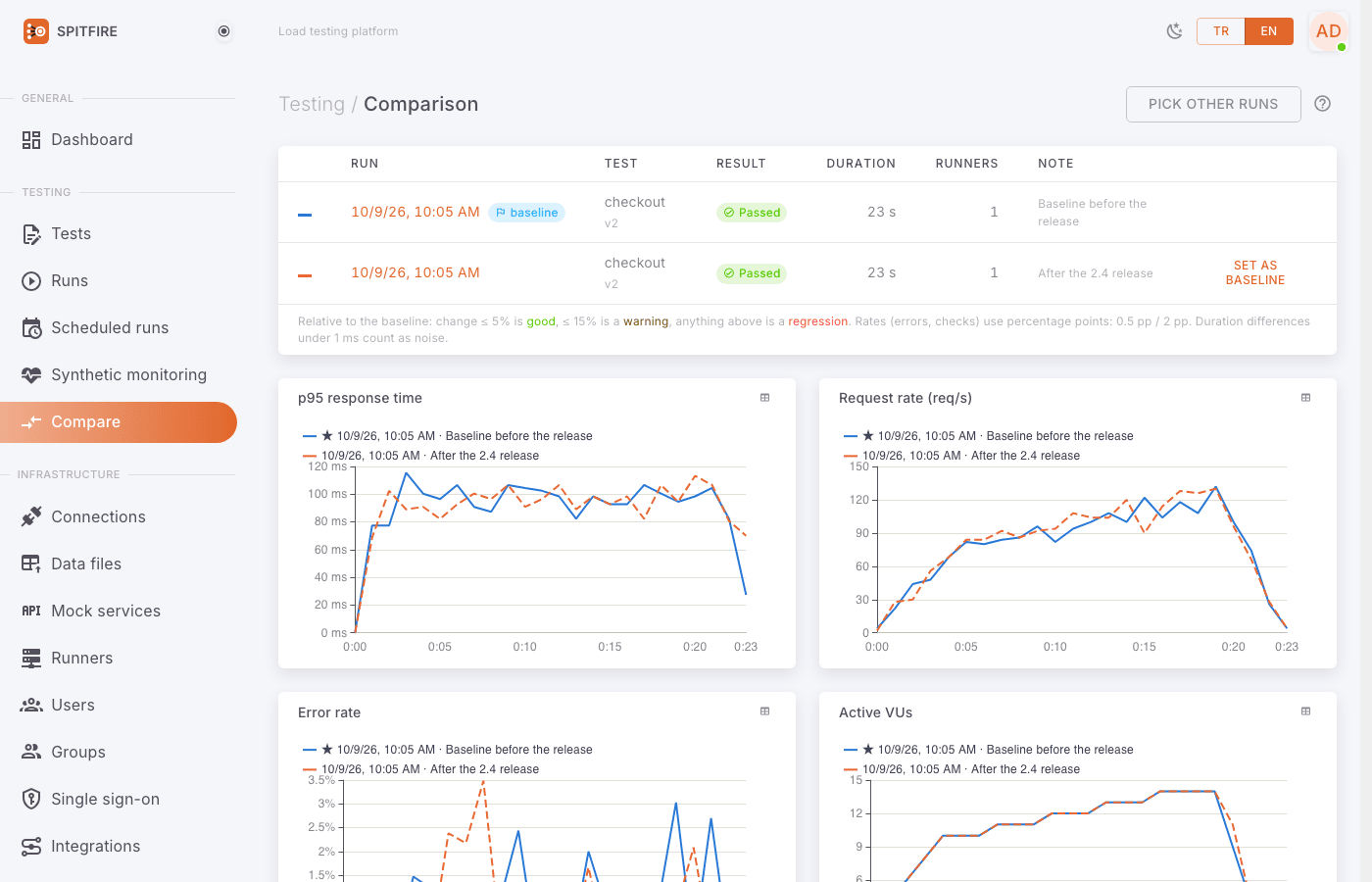
The Compare page in the left menu does something else: it puts 2–6 runs of the same test, made at different times, side by side against a baseline. Since they did not run at the same time there are no confidence intervals; it is a quick look at "what changed since the last release?".
 Compare page
- Open Compare in the left menu.
- Pick the test from Select a test….
- Tick 2–6 runs to compare and press Select. The first one you tick (or the test's baseline) becomes the reference; set as baseline makes another run the reference.
- The relative change against the baseline is coloured by the test's tolerance: good, warning, regression. Ratios (errors, checks) are judged in percentage points.
- Issues only shows only the rows that got worse.
If the runs' test definitions differ, the page warns that differences may also come from the definition change.
License notes
- Comparative runs need the
compare_runsfeature. The free edition has 1 comparative run per calendar month and, separately, 2 A/A calibrations a month (the License page shows the count). - Scheduled comparisons and those started from CI (with an API token) need
compare_ci(Growth yearly, Scale yearly, Enterprise); without it they are refused with402 license_limit. Those started from the web UI are not affected. - Comparative runs need runners of this version; older runners are refused with a clear message.
Common problems
| Symptom | Cause | Fix |
|---|---|---|
| "This test has no environments." | The test's Environments tab is empty | Define two environments in the editor (e.g. test, dev). The saved test can also be an arm. |
| Comparative runs not in the license / monthly allowance used | License feature or the free monthly allowance | Check the used count on the License page; wait for next month or upgrade. |
| Equivalence check Failed: an arm did not answer | The environment's address is unreachable from the runners, or the service is down | Check the environment's variables (address); check the runners can reach that network. Give a health endpoint as the Pre-check address. |
| No requests were sent: the test has no HTTP step | No HTTP step to measure, or the addresses are only known during the run | Give an address under Pre-check address (optional). |
| "These two environments share a database." | Both environments use the same resource | Use separate resources, or Switch to a sequential comparison. |
| The result is always Inconclusive | Short run, few requests, or a noisy environment | Run longer; check the Warm-up does not eat most of the run; run an A/A calibration. |
| The warm-up covered the whole run | Warm-up ≥ run duration | Shorten the warm-up or lengthen the test. |
| Invalid: an arm failed | A runner dropped or an arm failed | Look at the runner events on System events; start again. |
| Sequential mode Invalid: the wait ran out | The version did not change in time, or the switch was not confirmed | Raise Longest wait for a version switch; run spitfire cloud continue <id> at the end of the deploy, or define a version endpoint. |
--auto-switch is refused |
The environment has no version endpoint | Define a Version endpoint on the Environments tab. |
| Calibration says the versions look different | The environments report different versions | Deploy the same version; if they really are the same (different labels), tick the confirmation. |
402 license_limit (feature: compare_ci) in CI |
The license does not include comparisons from CI | Start the comparison from the web UI, or upgrade. |
| Older runners are refused | Comparisons need runners of this version | Update the runners (Runners page → Update). |
Related pages
- CI/CD integration — a pipeline gate with
--compare - Schedules and monitoring — nightly comparisons and the
run.comparednotification - Observability — what happened in the backend behind a difference
- Troubleshooting
- Compare
In Spitfire: /compare