Version: 0.21.0This documentation is for Spitfire 0.21.0.
CI/CD integration
This page explains, step by step, how to run a test saved in Spitfire from your CI/CD pipeline (GitHub Actions, GitLab CI, Jenkins, Azure Pipelines…), what the exit codes mean, how performance budgets and PR/MR comments work, and how to start a comparative run (version A/B) from a pipeline.
What it does
- Runs your load test on every pull request or after every deploy, without manual work.
- The pipeline step waits for the run and returns an exit code by its result: when a threshold or budget fails the step turns red, and the merge can be blocked.
- With
--pr-commentit writes a summary on the pull request (GitHub) or merge request (GitLab): each step's p95, p99 and error rate against the baseline (reference) run. - With
--compareit runs the same test against two environments at once and answers "is the new version slower?" with a statistical verdict.
The test runs on the controller; the CI machine only runs a small CLI (spitfire) and waits
for the result. Your runners generate the load, so the CI machine's size does not matter.
When to use it
- When you want to be sure every pull request keeps performance where it was.
- When you want a "smoke test" (a short, low-load run) after every deploy to staging.
- When you want to compare the new version with the live one before a release (see Version comparison).
- For nightly tests you can also use Spitfire's own schedules instead of a pipeline: Schedules and monitoring.
Before you start
- The test you want to run must be saved and should have run successfully at least once from the web UI (see it work by hand first).
- The user who creates the token must be allowed to run that test. An admin can run any
test; a user with the
userrole can run only the tests marked "can run" in one of their groups. If the test page shows a view only badge, your token cannot run it either. - The CI machine must reach Spitfire's web address (the HTTP port, 8470 by default on a Docker install, or the HTTPS address in front of it).
Creating an API token
The CLI connects to Spitfire with a personal API token. The token acts with its owner's current role and groups; it can only list and validate tests, start and stop runs and comparative runs, and read the results. Nothing else.
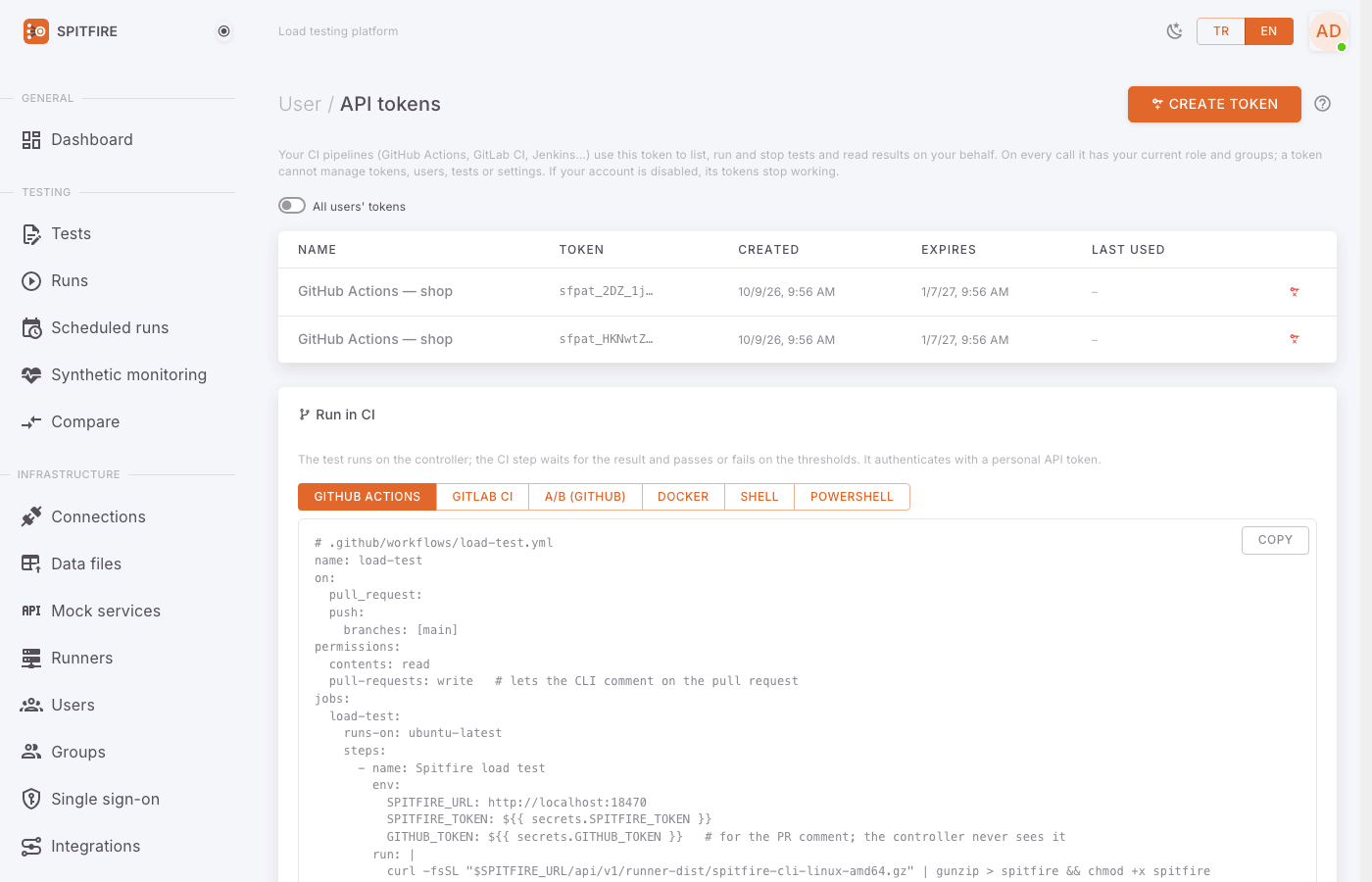 API tokens page
Step by step:
- Open your profile menu at the top right and click API tokens.
- Press Create token. The New API token dialog opens.
- Give the token a name that identifies the pipeline (e.g.
github-checkout-pr). The name shows in the audit log, so you can tell which pipeline started a run. - Choose Expires (it may be never). An expired token gets 401.
- Create it. The token (
sfpat_…) is shown only this once: copy it. - Store it in your CI's secret variable named
SPITFIRE_TOKEN:- GitHub: Settings → Secrets and variables → Actions.
- GitLab: Settings → CI/CD → Variables (Masked).
- Press Copied, close in the dialog.
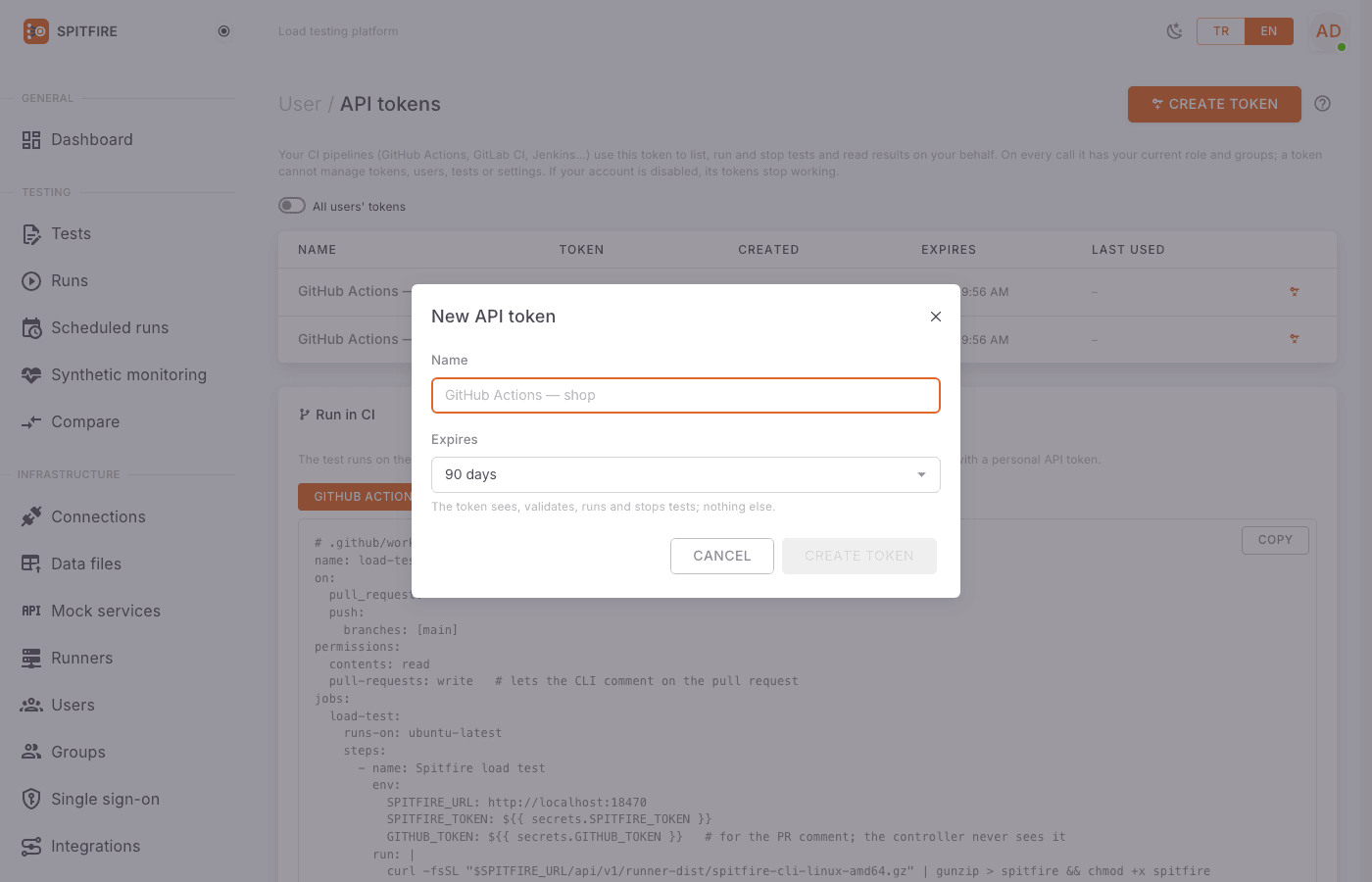 New API token dialog
Never write the token into a YAML file, a script or a command line. A --token
flag exists but is not recommended; always use the SPITFIRE_TOKEN environment variable.
If you suspect a token leaked, press Revoke on the same page. Pipelines using it start getting 401 at once; this cannot be undone. Then create a new token and update the CI variable.
Installing the CLI
The CLI needs no separate package: the controller serves the CLI of its own version, so the CLI and the controller always match.
Linux (amd64):
curl -fsSL "$SPITFIRE_URL/api/v1/runner-dist/spitfire-cli-linux-amd64.gz" | gunzip > spitfire && chmod +x spitfireWindows (PowerShell):
Invoke-WebRequest "$env:SPITFIRE_URL/api/v1/runner-dist/spitfire-cli-windows-amd64.exe" -OutFile spitfire.exe -UseBasicParsingDocker image: the CLI is also inside the Spitfire image:
docker run --rm -e SPITFIRE_URL -e SPITFIRE_TOKEN algebransoft/spitfire spitfire cloud run "Checkout flow"
The CLI reads these environment variables:
| Variable | Meaning |
|---|---|
SPITFIRE_URL |
Spitfire's web address, e.g. https://spitfire.example.com (or --url) |
SPITFIRE_TOKEN |
Personal API token (sfpat_…) |
SPITFIRE_WORKSPACE |
Optional: workspace name or id (or --workspace) |
A token works in the workspace it was created in, and test names are looked up there. An
installation admin's token for every workspace picks one with --workspace.
If the controller's certificate is signed by your own corporate CA, pass --ca corp-ca.pem.
--insecure does not verify the certificate at all; use it only in a trial setup.
To see which tests your token can see:
./spitfire cloud tests             # every test
./spitfire cloud tests checkout    # names containing "checkout"
Each line shows the test's id, version and name; tests you cannot run show (view only).
The CI button on the test page
You do not have to write the YAML by hand. The CI button at the top of the test page (Run in CI) shows ready examples for that test, with Spitfire's address and the test name filled in.
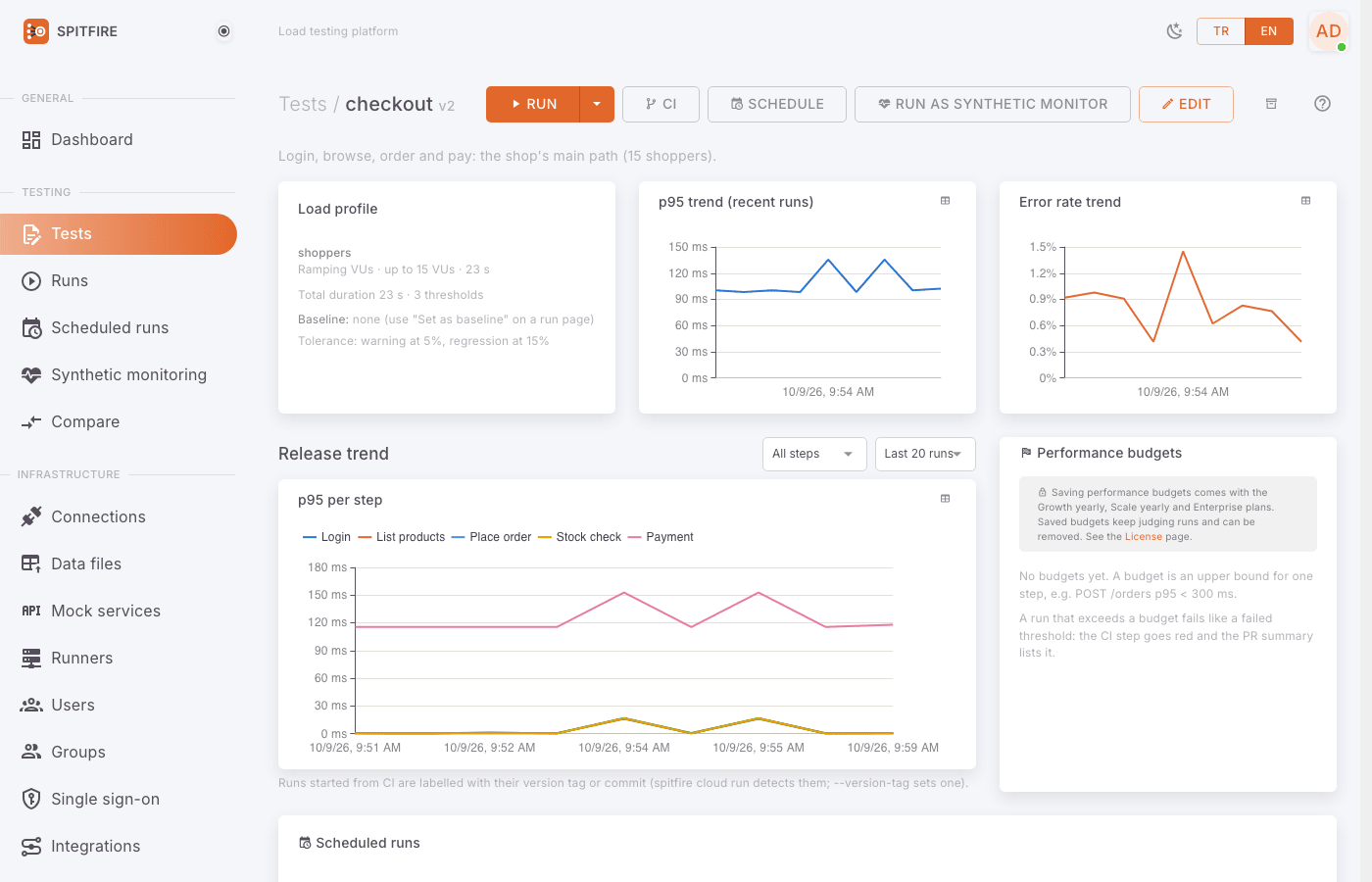 Test page header
- Open the test from the Tests page.
- Press CI at the top. The Run in CI dialog opens.
- Pick the tab for your pipeline: GitHub Actions, GitLab CI, A/B (GitHub), Docker, Shell or PowerShell.
- Use Copy at the top right and paste the text into your pipeline file.
- The Create an API token → link in the dialog takes you to the token page.
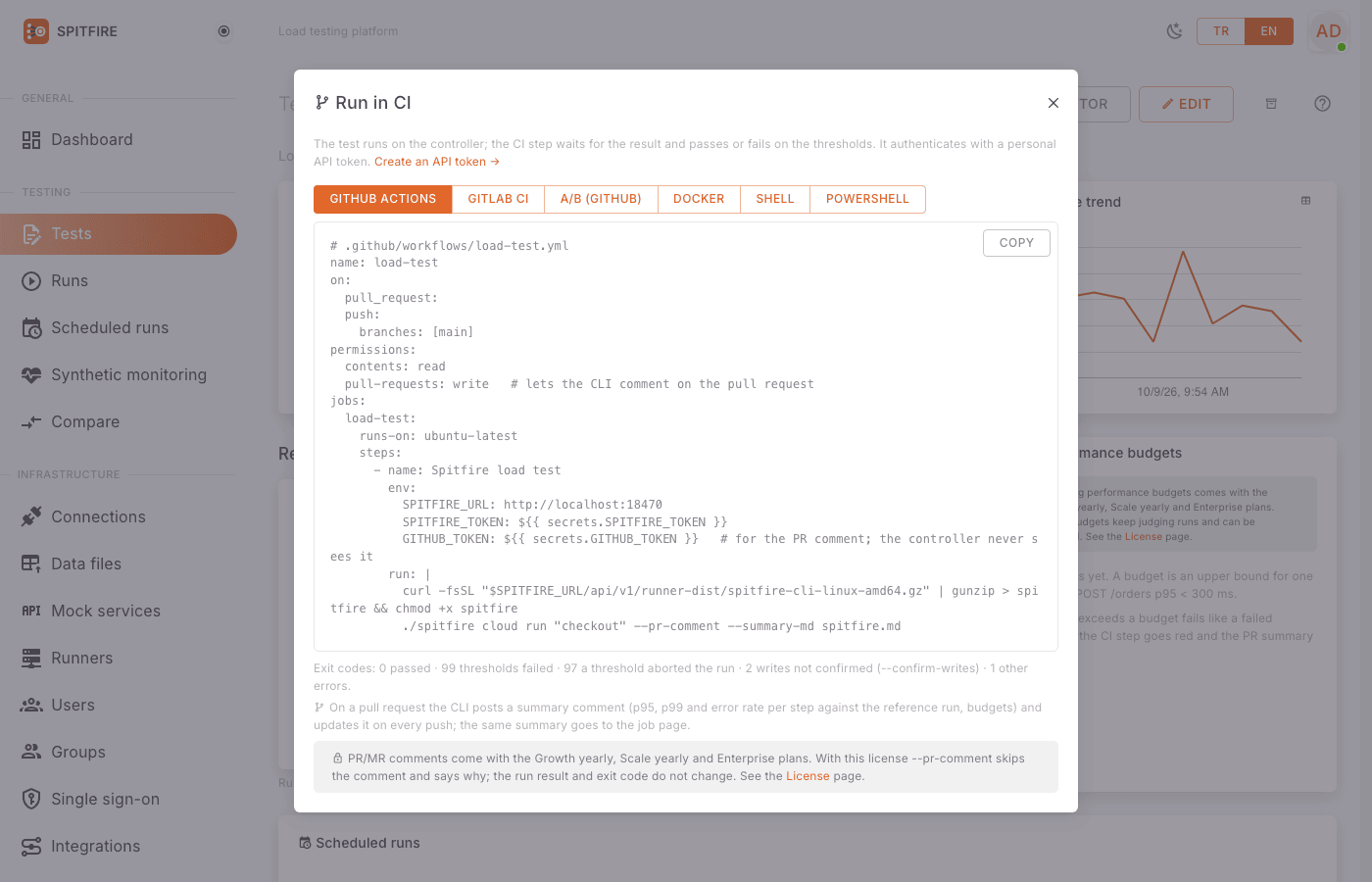 Run in CI dialog
The exit codes are listed under the snippet as well (0 passed, 99 thresholds failed, 97 aborted by a threshold, 2 writes not confirmed, 1 other errors).
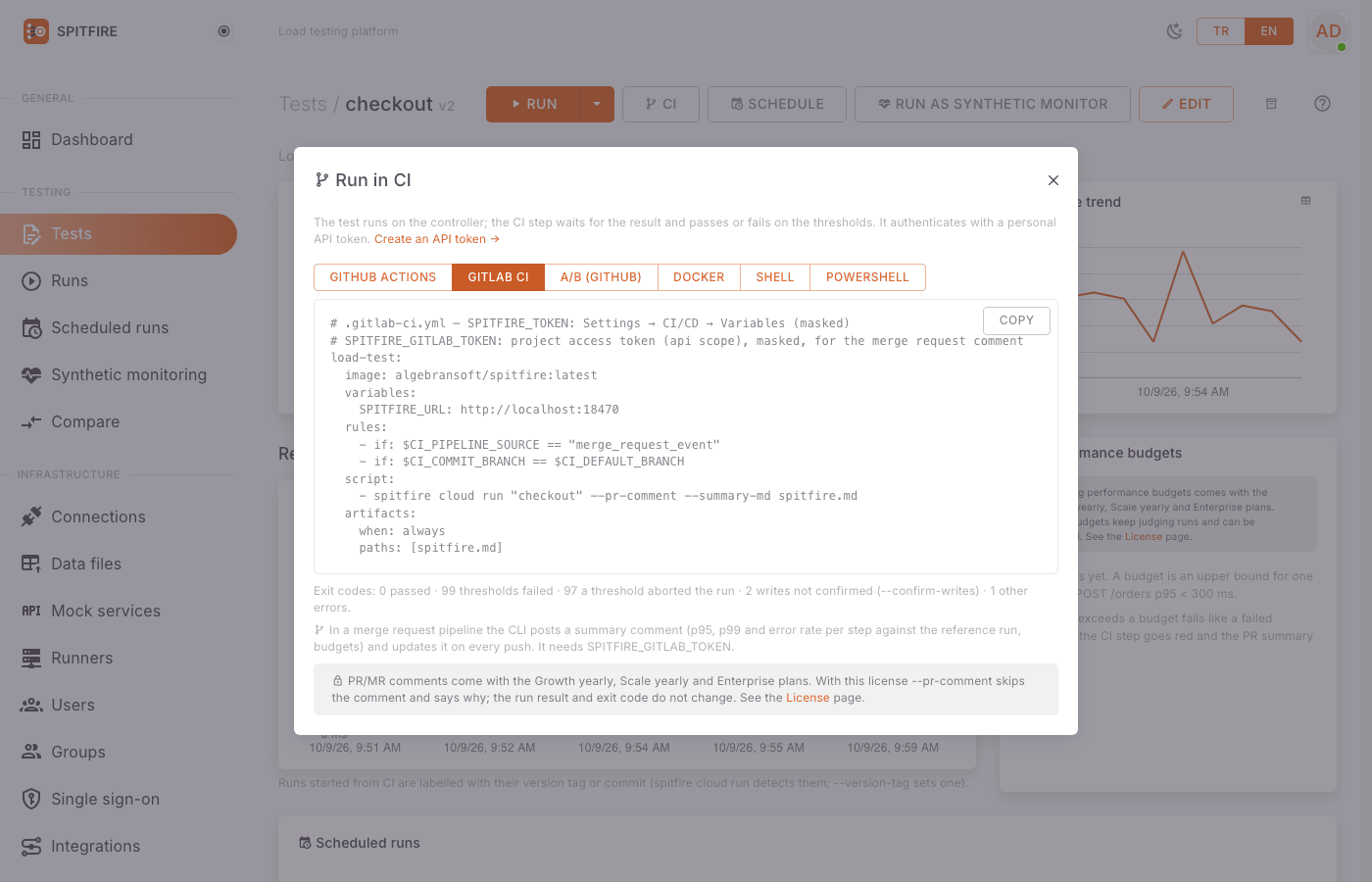 GitLab CI tab
The CI button shows only when you may run the test. The same examples are at the bottom of the API tokens page (with a placeholder instead of the test name).
Running a test from a pipeline
GitHub Actions
The simplest step:
# GitHub Actions step
- name: Load test
  env:
    SPITFIRE_URL: https://spitfire.example.com
    SPITFIRE_TOKEN: ${{ secrets.SPITFIRE_TOKEN }}
  run: |
    curl -fsSL "$SPITFIRE_URL/api/v1/runner-dist/spitfire-cli-linux-amd64.gz" | gunzip > spitfire && chmod +x spitfire
    ./spitfire cloud run "Checkout flow"
The step waits for the run. When it ends, the CLI prints the summary and exits by the result.
GitLab CI
# .gitlab-ci.yml — SPITFIRE_TOKEN: Settings → CI/CD → Variables (masked)
load-test:
  image: algebransoft/spitfire
  variables:
    SPITFIRE_URL: https://spitfire.example.com
  script:
- spitfire cloud run "Checkout flow"Jenkins, Azure Pipelines and others
In any shell the same two lines are enough:
export SPITFIRE_URL=https://spitfire.example.com
# SPITFIRE_TOKEN comes from the CI's secret variable
curl -fsSL "$SPITFIRE_URL/api/v1/runner-dist/spitfire-cli-linux-amd64.gz" | gunzip > spitfire && chmod +x spitfire
./spitfire cloud run "Checkout flow" --runners 2 -o summary.json
echo $?
On a Windows agent (Azure Pipelines, GitHub windows-latest, Jenkins):
$env:SPITFIRE_URL = 'https://spitfire.example.com'
Invoke-WebRequest "$env:SPITFIRE_URL/api/v1/runner-dist/spitfire-cli-windows-amd64.exe" -OutFile spitfire.exe -UseBasicParsing
.\spitfire.exe cloud run 'Checkout flow'
exit $LASTEXITCODECommon flags
| Flag | What it does |
|---|---|
"Checkout flow" |
The test's name or id (one argument) |
-r 2, --runners 2 |
How many idle runners to use (default 1) |
-l istanbul=60:2 -l frankfurt=40 |
Splits the load by location (name=percent[:runners]) |
--label zone=a |
Only runners with these labels |
--env staging |
Runs against one of the test's environments |
--scale 0.5 |
Multiplies the load (VUs, rates): 0.5 is half, 2 is double |
--var baseUrl=https://staging.example.com |
Changes a test variable for this run |
-o summary.json |
Writes the run summary as JSON |
--report report.pdf |
Writes the run report as PDF or .html (keep it as a build artifact) |
--report-lang en |
Report and PR summary language: tr (default) or en |
--timeout 30m |
Stops the run and fails after this long (default: planned duration + 15 min) |
--note "…" |
Run note (default: the pipeline, detected from its environment) |
--tag nightly |
Run tag (repeatable; default ci) |
--confirm-writes |
Allows a test whose steps modify data (see below) |
--commit, --ref, --version-tag v1.4.0 |
Commit, branch/tag and release label under test (default: from the CI environment) |
Runs started from CI are tagged ci, noted with the pipeline, and audited with the token's
name. The CLI reads the commit and branch from GitHub Actions, GitLab CI, Jenkins and Azure
Pipelines itself; the release trend on the test page labels each run with them.
Tests that change data
If the test has SQL/Mongo writes, a dangerous Redis command or an HTTP request marked as
modifying data, the CLI does not start it unconfirmed and exits 2. This is the
production write protection. If you really mean it, add --confirm-writes:
./spitfire cloud run "Create order" --env staging --confirm-writesThink twice before adding --confirm-writes to a pipeline that runs against
production: the test really writes data on every run.
Exit codes
A plain run (without --compare):
| Exit code | Meaning | In the pipeline |
|---|---|---|
0 |
Passed: every threshold and budget held | Step green |
99 |
A threshold or performance budget failed | Step red |
97 |
A threshold aborted the run | Step red |
2 |
The test changes data and --confirm-writes was not given |
Step red, the run did not start |
1 |
Other errors: connection, token, license, test not found, no idle runner… | Step red |
A comparative run (--compare) has different exit codes; see
Comparative runs from a pipeline below.
99 and 97 are k6-compatible; if you are moving from k6, your pipeline
conditions keep working.
Performance budgets
A performance budget is an upper bound for a step, e.g. POST /orders p95 < 300 ms or an
error rate under 1%. A run that exceeds one fails like a failed threshold: exit code 99, and
the run page, the comparison, the report and the PR summary show it.
Adding a budget, step by step:
- Open the test page and find the Performance budgets card.
- Press Edit at its top right (admins only). The Edit performance budgets dialog opens.
- Press Add budget.
- In the Step column pick the step from Pick a step….
- Pick the Statistic: p95, p99, p90, Average, Max or Error rate.
- Enter the bound under Must stay below (durations in ms, error rate in percent).
- Repeat for other steps if needed, and save.
Budgets live with the test but outside its versions: runs started after a change are judged by the new bounds; earlier runs do not change.
A budget pointing at a step that was removed from the test is marked step removed; it finds no data and fails the run. Delete it or pick another step.
Performance budgets, PR/MR comments and comparative runs from CI depend on your license plan (Growth yearly, Scale yearly, Enterprise). Without them, saved budgets keep judging runs but new ones cannot be saved.
PR and MR comments
--pr-comment writes a summary on the pull request (GitHub Actions) or merge request
(GitLab CI):
- each step's p95, p99 and error rate against the test's baseline (reference) run,
- ⚠️ where it got worse beyond the tolerance, e.g.
`/checkout` p95: 212 ms → 250 ms (+18%) ⚠️, - the budgets and thresholds.
Every push does not add another comment; it updates the same one (found by a hidden marker, one per test). Only the CI job writes the comment, with the token the pipeline gives it; the controller never talks to GitHub or GitLab.
GitHub Actions
- Give the workflow the
pull-requests: writepermission. - Add
GITHUB_TOKENto the step'senv. - Add
--pr-comment(and, if you like,--summary-md spitfire.md) to the command.
# .github/workflows/load-test.yml
on: [pull_request]
permissions:
  contents: read
  pull-requests: write          # the PR comment
jobs:
  load-test:
    runs-on: ubuntu-latest
    steps:
      - env:
          SPITFIRE_URL: https://spitfire.example.com
          SPITFIRE_TOKEN: ${{ secrets.SPITFIRE_TOKEN }}
          GITHUB_TOKEN: ${{ secrets.GITHUB_TOKEN }}
        run: |
          curl -fsSL "$SPITFIRE_URL/api/v1/runner-dist/spitfire-cli-linux-amd64.gz" | gunzip > spitfire && chmod +x spitfire
          ./spitfire cloud run "Checkout flow" --pr-comment --summary-md spitfire.md
--summary-md writes the same Markdown to a file; on GitHub the summary also goes to the
job page ($GITHUB_STEP_SUMMARY).
GitLab CI
- Create a project access token with the
apiscope in GitLab. - Store it as the masked variable
SPITFIRE_GITLAB_TOKEN(CI_JOB_TOKENis tried when it is missing, but most GitLab versions do not let it write merge request notes). - Run the job in merge request pipelines.
# .gitlab-ci.yml — SPITFIRE_TOKEN: Settings → CI/CD → Variables (masked)
# SPITFIRE_GITLAB_TOKEN: project access token (api scope), masked
load-test:
  image: algebransoft/spitfire
  variables:
    SPITFIRE_URL: https://spitfire.example.com
  rules:
    - if: $CI_PIPELINE_SOURCE == "merge_request_event"
    - if: $CI_COMMIT_BRANCH == $CI_DEFAULT_BRANCH
  script:
    - spitfire cloud run "Checkout flow" --pr-comment --summary-md spitfire.md
  artifacts:
    when: always
paths: [spitfire.md]Tolerance and baseline
--pr-tolerance 10flags a step ⚠️ when its p95/p99 is more than 10% worse than the baseline. By default the test's own tolerance applies.- Without a baseline run the summary lists the values and says how to set one. You set the baseline with Set as baseline on a run page.
A comment that cannot be posted (no permission, no token, not in the license) is only a warning: the CLI says why, but the exit code stays the run's result.
Comparative runs from a pipeline
--compare runs the test against two of its environments at the same time and with the
same load, waits for the verdict, prints the per-step differences and exits by the verdict.
Details: Version comparison.
spitfire cloud run "Checkout flow" --compare A=test,B=dev --label-a v2.3 --label-b "$GIT_SHA"| Exit code | Meaning |
|---|---|
0 |
better or no difference (and inconclusive, without --fail-on-inconclusive) |
98 |
worse (and inconclusive, with --fail-on-inconclusive) |
97 |
invalid: an arm failed or a runner dropped, or the equivalence pre-check failed with --strict |
99 |
arm B (the candidate) failed its thresholds or a performance budget |
2, 1 |
writes not confirmed (--confirm-writes confirms both environments), other errors |
Order: invalid and worse first, then arm B's thresholds, then inconclusive.
Comparison-only flags: --label-a, --label-b, --fail-on-inconclusive, --strict,
--compare-mode sequential, --rounds, --switch-timeout, --auto-switch. They cannot be
given without --compare; --env and --var cannot be given with it. Here --scale is each
arm's share of the test's load (default 0.5).
GitHub Actions (the A/B (GitHub) tab on the test page gives the same):
# .github/workflows/version-compare.yml
on: [pull_request]
permissions:
  contents: read
  pull-requests: write
jobs:
  compare:
    runs-on: ubuntu-latest
    steps:
      - env:
          SPITFIRE_URL: https://spitfire.example.com
          SPITFIRE_TOKEN: ${{ secrets.SPITFIRE_TOKEN }}
          GITHUB_TOKEN: ${{ secrets.GITHUB_TOKEN }}
        run: |
          curl -fsSL "$SPITFIRE_URL/api/v1/runner-dist/spitfire-cli-linux-amd64.gz" | gunzip > spitfire && chmod +x spitfire
          ./spitfire cloud run "Checkout flow" --compare A=test,B=dev \
            --label-a v2.3 --label-b "$GITHUB_SHA" --pr-comment --report comparison.pdf
GitLab CI:
# .gitlab-ci.yml — SPITFIRE_TOKEN and SPITFIRE_GITLAB_TOKEN as masked variables
version-compare:
  image: algebransoft/spitfire
  variables:
    SPITFIRE_URL: https://spitfire.example.com
  rules:
    - if: $CI_PIPELINE_SOURCE == "merge_request_event"
  script:
    - spitfire cloud run "Checkout flow" --compare A=test,B=dev --label-a v2.3 --label-b "$CI_COMMIT_SHORT_SHA" --pr-comment --fail-on-inconclusive --strict --report comparison.html
  artifacts:
    when: always
paths: [comparison.html]A comparative run from CI (with an API token) needs the compare_ci license feature
(Growth yearly, Scale yearly, Enterprise). Without it the start is refused with
402 license_limit and the CLI says so plainly. Comparisons started from the web UI are not
affected.
Common problems
| Symptom | Cause | Fix |
|---|---|---|
The CLI stops with 401 |
Wrong, revoked or expired token; or SPITFIRE_TOKEN did not reach the step |
Check the token's state (active, revoked, expired) on the API tokens page; create a new one and update the CI variable if needed. Make sure SPITFIRE_TOKEN is under the step's env:. |
| "An API token cannot do this; sign in." | A token can only list, run and stop tests and read results | Do that action in the web UI. |
| Test not found | Different spelling, another workspace, or the token's owner cannot see the test | List the visible tests with ./spitfire cloud tests; pass --workspace or use the test's id. |
(view only) next to the test |
The token's owner may not run it | An admin must mark the test "can run" in one of the user's groups. |
Exit code 2 |
The test changes data | If intended, add --confirm-writes. |
Exit code 1, "Not enough idle runners" |
Runners busy in another run or offline | Check the Runners page; lower --runners or wait for runs to end. See Troubleshooting. |
Exit code 1, 402 license_limit |
Planned VUs, rate, duration, runners or locations exceed the license | Lower the load with --scale or upgrade the license. See Troubleshooting. |
| TLS / x509 certificate error | The controller's certificate is signed by a CA the CI machine does not know | Pass --ca corp-ca.pem. --insecure only for trials. |
| No PR comment | Missing pull-requests: write or GITHUB_TOKEN; on GitLab no SPITFIRE_GITLAB_TOKEN; the license does not include PR comments |
Read the warning in the CLI output; add the permission/token. The exit code is not affected. |
| The comment has no ⚠️ and says there is no baseline | The test has no baseline run | Press Set as baseline on a run page. |
The step fails on --timeout |
The run took longer than planned or waited in the queue | Raise --timeout; make sure runners are idle. |
| "--compare names the environments: leave out --env and --var" | --env/--var given with --compare |
Name the environments only with --compare A=…,B=…. |
Related pages
- Version comparison — the statistics and verdict behind
--compare - Schedules and monitoring — regular runs and notifications without a pipeline
- Troubleshooting — error codes, system events, support bundle
- API tokens
In Spitfire: /api-tokens